Storageapk logo
App icon

Photo Tool

COLIFER LAB
4.2
Downloads
10M+
Content Rating
Rated for 3+
Classification
Video Players & Editors
Developer
COLIFER LAB
Privacy policy
https://zoularry.github.io/pp.html

Apps Screenshots

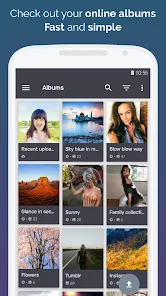
snapshot1
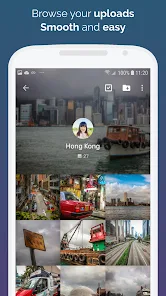
snapshot2
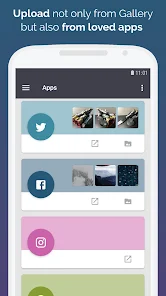
snapshot3
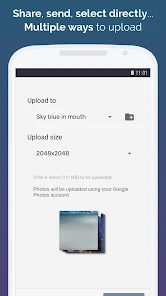
snapshot4
snapshot5
snapshot6

Editor Evaluation

I've been using the Photo Tool app from COLIFER LAB for a few months now, and it's honestly become my go-to for basic image editing on my phone. It's a photo editing and enhancement utility that lets you do things like crop, resize, add filters, adjust colors, and even remove backgrounds. The app first launched back in 2022, and you can grab it from both the Google Play Store and the Apple App Store. On Google Play, it's already racked up over 10 million installs, which is pretty impressive for a niche tool. The best part? It's completely free to download and install. You don't need to register or create an account to start using the app, which is a huge plus in my book. There are some in-app purchase options for premium filters and advanced features, and you will run into occasional in-app ads, but they're not too intrusive.

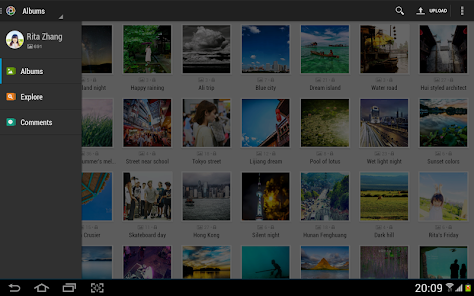
Using the Photo Tool app is pretty straightforward. After you install the app from the Google Play Store, you just open it and hit the big "Open Image" button to select a photo from your gallery. The interface is clean and simple, with all the tools laid out at the bottom. A tip I picked up is to use the "Auto Enhance" feature first if you're ever unsure where to start -- it balances lighting and contrast with one tap. Another trick I love is their batch processing mode, which lets you apply the same edit to multiple photos at once. Just load up all the images you want, apply a filter or resize setting, and hit "Apply to All." It saves a ton of time when I'm preparing pictures for social media.

Compared to other similar apps like Snapseed or Adobe Lightroom, Photo Tool is way simpler to use. It doesn't have a steep learning curve, and you don't need to watch tutorials to figure out where things are. While Snapseed is great for professional-level editing and Lightroom offers powerful presets, I find myself coming back to Photo Tool because it loads faster and doesn't bog down my older phone. It's not the most feature-rich app out there, but for quick, everyday edits, it does everything I need without bloat.

Capabilities

  • 📷 One standout feature is the "Magic Eraser" tool. Unlike apps like TouchRetouch, which require you to carefully paint over objects, Photo Tool's version just needs you to circle the object you want gone, and the app intelligently fills in the background. It's not always perfect, but it's fast and works great for small distractions like wires or blemishes.
  • 🎨 The filter collection is another strong point. While apps like VSCO have a massive library, Photo Tool has a curated set of about 50 filters that actually look good. They're not over-the-top or unnatural. I especially love the "Vintage" series, which gives photos a warm, film-like tone without making them look fake.
  • 🖼️ Batch processing is a lifesaver for anyone who takes a lot of photos. Apps like Google Photos don't offer this level of control for free. In Photo Tool, you can select up to 50 images, then resize them all to a specific dimension, change the format from PNG to JPEG, or compress them for sharing. It beats doing them one by one in any other app I've tried.
  • 🌐 Cloud backup integration is a nice touch. You can set the app to auto-save your edited images directly to Google Drive or Dropbox. Similar apps like Snapseed usually just save locally, so this extra convenience sets Photo Tool apart for users who want everything backed up without extra steps.

Highlights

  • ✅ The app is incredibly lightweight. After downloading it from the Google Play Store, the install takes up less than 50 MB of storage. In contrast, Adobe Lightroom can take up over 200 MB easily, which makes Photo Tool perfect for phones with limited space.
  • ✅ No registration needed. You just install the app and start editing. Other apps like PicsArt force you to sign up or connect social media before you can even use basic features, which always annoyed me.
  • ✅ The learning curve is practically zero. My mom, who isn't great with tech, figured out how to use Photo Tool to remove a sun flare from her vacation photo in under two minutes. I can't say the same for more complex apps like Snapseed, which has layers and masks that confuse casual users.

Lowlights

  • ❌ The ads can be a bit bothersome. After you finish editing an image and tap "Save," a full-screen video ad sometimes pops up before the file is saved. Apps like Snapseed are completely ad-free even without any purchase, so this is where Photo Tool falls short.
  • ❌ The text editing tool is quite basic. If you want to add stylish text overlays like you can in PicsArt or Canva, Photo Tool's options are limited to just a few fonts and colors. You can't rotate text freely or add shadows without paying for the premium version.
  • ❌ There's no layer support or masking feature. For more advanced photo composites or selective edits, I still have to switch to something like Adobe Photoshop Express. Photo Tool is great for straightforward edits, but power users will hit a ceiling quickly.

Related Recommendation Data

Photo Tool
Photo Tool
COLIFER LAB
4.2
Money App - Earn Real Cash
International Calls App, Ltd
4.5
Sun Signs: Horoscopes
horoscope.com
4.4
Horoscope For Today
Horoscope For Today
KaApps
4
Love Horoscopes & Astrology
Horoscope TV
4.4
Ugly Camera - funny selfie
jangal LLC
4
Slow motion video fast&slow mo
One Music Player
4.5
Contacts
Contacts
Google LLC
4.2
Call Mirabel Encanto Fake Chat
Brovo developer
4.6
Quiz Challenge: Funny Filter
Braly JSC
0
Live Wallpapers HD 4K
Wallpaper app
4.4
Emoji Battery Widget
MIA Studio Inc
0
Lie Detector Test for Prank
Hydra Global Ltd.
4.6
Walli - Stunning 4K Wallpapers
Tap AI
4.3
ヘルスケア手帳 - 電子お薬手帳アプリ
ヘルスケア手帳 - 電子お薬手帳アプリ
Wemex Corporation
3.4

Disclaimer

1. All trademarks, product names, and company names featured on this site belong to their respective owners.

2. Storageapk provides specialized soccer applications developed by our in-house soccer team, accompanied by comprehensive details such as developer contact info, user ratings, and app screenshots.

3. As part of our compliance efforts, Storageapk adheres to the Digital Millennium Copyright Act (DMCA) and responds to valid infringement notices in accordance with the DMCA and other relevant laws.

4. It is important to note that Storageapk is not affiliated with any app developer, nor do we create any applications or games ourselves.

5. Should you be an owner or copyright representative wishing to have your information taken down, you may contact us via email at [email protected].

6. All website content strictly follows the guidelines outlined in the Google Ads advertising policies and the Google Unwanted Software Policy.

What You Like

DeepArtEffects AI Photo Editor
Deep Art AI GmbH
4.6
Labyrinthos Tarot Cards
Labyrinthos Academy
4.7
Live Wallpapers 3D
Live Wallpapers 3D
FunJoy Games Studio
4.3
Razor Prank (Hair Trimmer Joke
RRM Jokes, Pranks and fun apps
3.6
Sider: AI GPT Deep Chat
Sider.ai
4.5
Astrolink: Birth Chart
Astrolink Orbe
4.4
Neon Love Theme
Neon Love Theme
Delicate theme for Android App
4.6
Photo Tool
Photo Tool
COLIFER LAB
4.2
Astroscope: Astrology Guide
Astroscope App
4.4
SNAPS-photobook, photo, print
SNAPS Corp.
4.2
Digital Compass
Digital Compass
Axiomatic Inc.
4.6
知らないと恥ずかしい大人の語彙力
知らないと恥ずかしい大人の語彙力
nullhouse
4.6
Love Horoscopes & Astrology
Horoscope TV
4.4
Love Rose GIF Stickers
photo studios
3.4
NewProfilePic: Profile Picture
PHOTO LAB DMCC
4.3