App listing review
Color Pop - Fun Coloring Games
Published by MWM - AI Music and Creative Apps
Prepared by Storageapk Editorial Team
First recorded:
Source checked:
Basis: Listing fields, screenshots, developer sources, and Android package-risk checks
Review basis
This page checks the stored listing, screenshots, developer sources, version details, and package identity. It does not claim hands-on testing. Confirm changing features, availability, and permissions with the developer.
Read our editorial and corrections policyListing screenshots
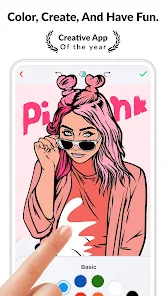
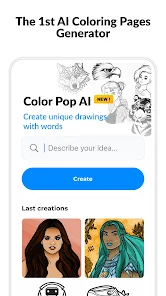
These images are listing material supplied for the app. They are useful for checking interface expectations but are not presented as Storageapk test evidence.


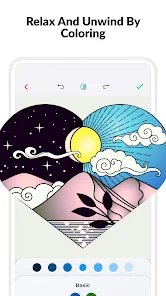
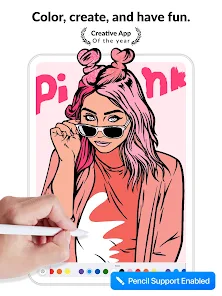
Overview
This record covers Color Pop - Fun Coloring Games by MWM - AI Music and Creative Apps, listed in Entertainment. The package recorded for this page is com.mwm.procolor.
The main review questions are whether the current controls match the intended task, what data the app needs, and what changes when the device, account, or network conditions differ.
The notes below use the stored listing, screenshots, version record, developer links, and Android package identity. They do not claim a laboratory test or personal use of the app, so changing features must be checked against the current developer release.
Listing details
Android uses the package name and signing certificate to distinguish one application from another. A matching title or icon is not enough to establish that a file is the same release.
Ratings and install totals are listing snapshots rather than Storageapk measurements. Version, size, and availability can change after the source-check time shown on the page.
- Title: Color Pop - Fun Coloring Games
- Developer: MWM - AI Music and Creative Apps
- Package: com.mwm.procolor
- Category: Entertainment
- Content rating: Rated for 3+
- Listing installs: 10M+
- Listing score: 4.3
- Stored version: 2.03.00
- Listed package size: 137.3 MB
- Listing screenshots: 6
Current feature checks
These topics come from the app-specific listing record. Check each one in the current release because controls, account requirements, and regional availability can change.
Screenshots can show where a control was placed at one point in time, but they do not prove current behavior or output quality.
- Tap-to-Fill Mechanic: Confirm that this option is still present and available for the relevant device and region. Note the Android version, account, connection, permission, and device conditions required for a repeatable result.
- Vast Library with Regular Updates: Use a small sample task to verify the input, controls, and result before relying on it. Note the Android version, account, connection, permission, and device conditions required for a repeatable result.
- Built-in Relaxation Mode: Check this control in the current release and note the steps needed to reach it. Note the Android version, account, connection, permission, and device conditions required for a repeatable result.
Where it may fit
Suitability depends on the task, device, and data involved. The following points are practical checks rather than claims of superior performance.
- Instant Gratification: Confirm that the result is useful on the intended screen size, account, and Android version. Note the Android version, account, connection, permission, and device conditions required for a repeatable result.
- Free Content Without Paywalls: Judge this point against the specific task the app is being considered for. Note the Android version, account, connection, permission, and device conditions required for a repeatable result.
- Offline Play Capability: Check the setup time and ongoing access needed before treating this as a practical benefit. Note the Android version, account, connection, permission, and device conditions required for a repeatable result.
Limits to consider
Before relying on Color Pop - Fun Coloring Games, check these possible limits against recent release notes and the intended Android device.
- Repetitive Color Palette: Check whether this restriction still applies to the stored version and the intended device. Inspect source access, preview accuracy, output resolution, saved-file location, and retained metadata.
- Too Many Ads for Free Players: Look for a current developer note or a documented workaround before depending on this part of the app. Check controls, account use, age rating, post-install storage, progress saving, and optional purchase gates.
- No Zoom to See Tiny Sections: Try this boundary with non-sensitive sample data and stop if the required access is excessive. Note the Android version, account, connection, permission, and device conditions required for a repeatable result.
Privacy and installation checks
Keep Play Protect enabled, review each requested permission, and deny special access that is not needed for a feature deliberately opened by the user.
Before installing Color Pop - Fun Coloring Games, confirm com.mwm.procolor, calculate the file SHA-256 checksum, inspect the signing certificate, and compare the signer with a release obtained from a trusted source.
A privacy-policy URL is present in the listing. Read it for collection, retention, sharing, deletion, and contact details before granting sensitive access.
A developer website is also recorded. Use it together with https://play.google.com/store/apps/details?id=com.mwm.procolor to verify support information and current availability.
The app may be suitable when its current controls, compatibility, permissions, and data handling match the intended task. Stop installation when the package, signer, requested access, or visible behavior differs from the trusted source.
Primary listing sources
Confirm current availability, permissions, pricing, and release notes with the developer before installing any package.