Storageapk logo
App icon

Walking: Pedometer diet

AGI Applications
4
Downloads
1M+
Content Rating
Rated for 3+
Classification
Health & Fitness
Developer
AGI Applications
Privacy policy
https://www.agiapplications.nl/privacy-policy/

Apps Screenshots

snapshot1
snapshot2
snapshot3
snapshot4
snapshot5
snapshot6

Editor Evaluation

The Walking: Pedometer diet app, created by AGI Applications, is available on the Google Play Store and the Apple App Store. It is a straightforward health tracker that helps you keep tabs on your daily walks, steps, and calorie burn. The app first launched a few years ago and has built a solid user base, racking up over a million installs on Google Play alone. You can download it for free, and it does not require you to create an account or log in to start using it, which is a huge plus for those who value privacy. The app does feature in-app ads, but you can remove them with a small one-time purchase.

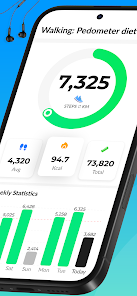
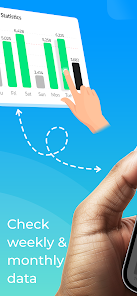
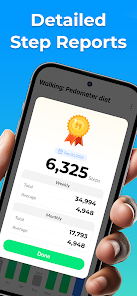
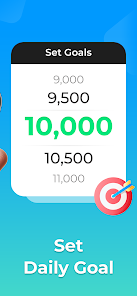
Using the Walking: Pedometer diet app is incredibly simple. Once you install it, it automatically starts counting your steps using your phone's built-in sensors. You do not need to manually start a session, as it works in the background. For the best accuracy, keep your phone in your pocket or bag while you walk. The app calculates distances traveled, active minutes, and calories burned based on your height and weight settings. A great tip is to set a daily step goal within the app to keep yourself motivated. You can also review your history to see your progress over days or weeks, which helps you stay consistent with your walking routine.

I have tried a few other pedometer apps on the market, like Google Fit and Samsung Health, but I ended up sticking with this one for a few reasons. Google Fit feels a bit too integrated with other services for my taste, while Samsung Health comes bloated with features I never use. Walking: Pedometer diet is refreshingly minimal. It focuses purely on counting steps and estimating calorie burn without trying to be a full fitness suite. I also appreciate that it does not force me to log in or sync data with a cloud service. For someone who just wants a simple, no-fuss way to track daily steps, this app is a better fit.

Capabilities

  • 🔋 Automatic step detection: Unlike the Google Fit app, which sometimes requires you to manually start a walk, this pedometer diet app truly runs in the background. It picks up on your movement without you having to open it, making it feel like a set-and-forget tool.
  • 📊 Simple offline history: The app saves your stats locally on your device. I have noticed that many similar apps, like Pacer, need a constant internet connection to display your history. With this app, you can check your past days without worrying about data signal.
  • ⏱ Calorie count based on pace: It estimates your calorie use during walks according to your walking speed, not just your step count. This feels more accurate than what I got from the basic Samsung Health pedometer, which just uses a fixed formula based on weight alone.

Highlights

  • 🔋 It does not drain your phone battery too quickly compared to apps like Runkeeper, which rely on GPS tracking all the time. This pedometer diet app uses the phone's accelerometer primarily, so my phone lasts the whole day even with the app running.
  • 📂 It takes up very little storage space on your device. I have tried installing other walking apps from the Google Play Store, such as Stepz, which ate up over 100 MB. This one is much lighter and works fine on older phones.
  • 👣 It works well with the phone in a handbag or pocket. Some apps like StepsApp lose track of steps if the device is not held in a specific way, but this app is more flexible with sensor input.

Lowlights

  • ❌ The app does not sync with smartwatches like the Mi Band or Apple Watch. If you use those devices, you would be better off using the manufacturer's own apps or something like Google Fit instead.
  • ❌ There is no social or leaderboard feature in this app. For those who like the competitive aspect found in apps like Walkr or StepBet, this will feel lonely.
  • ❌ It can sometimes overcount steps if you move your hands a lot while sitting, like when typing or cooking. I have noticed this is a common issue with basic pedometer apps, but it happens more frequently here.

Related Recommendation Data

Photo Tool
Photo Tool
COLIFER LAB
4.2
Money App - Earn Real Cash
International Calls App, Ltd
4.5
Sun Signs: Horoscopes
horoscope.com
4.4
Horoscope For Today
Horoscope For Today
KaApps
4
Love Horoscopes & Astrology
Horoscope TV
4.4
Ugly Camera - funny selfie
jangal LLC
4
Slow motion video fast&slow mo
One Music Player
4.5
Contacts
Contacts
Google LLC
4.2
Call Mirabel Encanto Fake Chat
Brovo developer
4.6
Quiz Challenge: Funny Filter
Braly JSC
0
Live Wallpapers HD 4K
Wallpaper app
4.4
Emoji Battery Widget
MIA Studio Inc
0
Lie Detector Test for Prank
Hydra Global Ltd.
4.6
Walli - Stunning 4K Wallpapers
Tap AI
4.3
ヘルスケア手帳 - 電子お薬手帳アプリ
ヘルスケア手帳 - 電子お薬手帳アプリ
Wemex Corporation
3.4

Disclaimer

1. All trademarks, product names, and company names featured on this site belong to their respective owners.

2. Storageapk provides specialized soccer applications developed by our in-house soccer team, accompanied by comprehensive details such as developer contact info, user ratings, and app screenshots.

3. As part of our compliance efforts, Storageapk adheres to the Digital Millennium Copyright Act (DMCA) and responds to valid infringement notices in accordance with the DMCA and other relevant laws.

4. It is important to note that Storageapk is not affiliated with any app developer, nor do we create any applications or games ourselves.

5. Should you be an owner or copyright representative wishing to have your information taken down, you may contact us via email at [email protected].

6. All website content strictly follows the guidelines outlined in the Google Ads advertising policies and the Google Unwanted Software Policy.

What You Like

DeepArtEffects AI Photo Editor
Deep Art AI GmbH
4.6
Labyrinthos Tarot Cards
Labyrinthos Academy
4.7
Live Wallpapers 3D
Live Wallpapers 3D
FunJoy Games Studio
4.3
Razor Prank (Hair Trimmer Joke
RRM Jokes, Pranks and fun apps
3.6
Sider: AI GPT Deep Chat
Sider.ai
4.5
Astrolink: Birth Chart
Astrolink Orbe
4.4
Neon Love Theme
Neon Love Theme
Delicate theme for Android App
4.6
Photo Tool
Photo Tool
COLIFER LAB
4.2
Astroscope: Astrology Guide
Astroscope App
4.4
SNAPS-photobook, photo, print
SNAPS Corp.
4.2
Digital Compass
Digital Compass
Axiomatic Inc.
4.6
知らないと恥ずかしい大人の語彙力
知らないと恥ずかしい大人の語彙力
nullhouse
4.6
Love Horoscopes & Astrology
Horoscope TV
4.4
Love Rose GIF Stickers
photo studios
3.4
NewProfilePic: Profile Picture
PHOTO LAB DMCC
4.3