Storageapk logo
App icon

Adobe Photoshop Mix - Cut-out,

Adobe
3.4
Downloads
10M+
Content Rating
Rated for 3+
Classification
Video Players & Editors
Developer
Adobe
Privacy policy
https://www.adobe.com/privacy/policy.html

Apps Screenshots

snapshot1
snapshot2
snapshot3
snapshot4

Editor Evaluation

I've been using Adobe Photoshop Mix on my phone for a while now, and honestly, it's a pretty solid tool for quick photo edits on the go. It's basically a mobile app that lets you cut out subjects from images, combine them, and adjust lighting or colors—all without needing a full desktop setup. The app first launched around 2015 and is available on both Google Play and the Apple App Store. On Google Play alone, it's been downloaded over 10 million times, which tells you it's got a decent following. The good news? It's totally free to download and install, and you don't even need to register an account to start using it right away. There are some in-app purchases if you want extra features like advanced exports, and there are occasional ads, but they're not too intrusive.

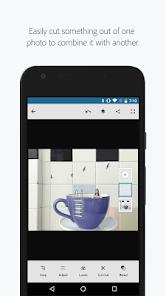
When it comes to actually using the app, the workflow is pretty simple. You start by importing a photo or grabbing one from your camera roll. The main trick is using the “cut-out” tool—just swipe over the area you want to isolate, and the app does a decent job of figuring out the edges. A tip I've picked up is to zoom in on tricky spots like hair or loose fabric, so the selection is cleaner. After that, you can drop the cutout into a new background or tweak things like brightness and contrast. It's not meant for heavy editing, but for quick composites, it gets the job done.

Compared to other apps like PicsArt or Background Eraser, I find myself leaning toward Photoshop Mix mainly because of Adobe's ecosystem. If you've ever used Photoshop on your computer, the interface feels familiar in a simplified way—it's not cluttered with a million buttons. PicsArt has more filters and stickers, which is fun for social media stuff, but it can feel bloated. Background Eraser is great for just cutting out images, but it lacks the adjustment tools that this app offers. For me, it's about having a balance between precision and extra tweaks without overcomplicating things.

Capabilities

  • 😎 The standout feature for me is the “Cut-out” tool itself. Unlike something like SnapSeed, where selecting objects feels clunky, this app uses a smart edge detection that learns as you swipe. It's not perfect every time, but on clear subjects like a person standing against a plain wall, it works way faster than manually tracing paths. I've tried similar tools in other apps, and this one just feels more responsive.
  • 😎 Another big plus is the “Refine Edge” option after you make a selection. You can soften or feather the edges really easily, which is a lifesaver when you're dealing with hair or fur. In apps like PixelCut, you don't get that level of control—it's usually a hard cutout or nothing. Here, I can tweak it until it looks natural, saving me time from going back to a desktop editor.
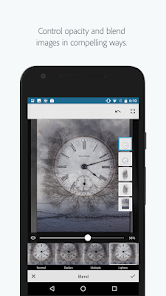
  • 😎 The “Adjustments” panel is also pretty handy for quick fixes. You can tweak exposure, contrast, or saturation right after you've pasted your cutout onto a new background. Most cut-out-focused apps don't include this, so you'd have to jump to another app like Lightroom to finish the job. Being able to do it all in one place keeps my workflow way smoother.

Highlights

  • 🌟 One major strength is the “Auto Selection” tool. Compared to Superimpose, which requires you to manually paint every section, this app's auto mode saves me a ton of tapping. It picks up on color differences and edges quickly, so for simple shapes, I just tap once and it's done.
  • 🌟 The app handles high-resolution images really well too. I've thrown in 12-megapixel photos from my camera, and it doesn't lag or crash like some lighter apps do. That's a big deal if you're working with detailed shots for a project.
  • 🌟 Integration with Adobe Creative Cloud is a game-changer. I can start an edit on my phone, save it, and open it on my laptop in Photoshop later. Apps like Remove.bg don't offer that kind of cross-device support, so if you're already in the Adobe world, this app feels like a natural extension.

Lowlights

  • 😕 A big weakness is the occasional inaccuracy on complex backgrounds. I've tried cutting out a person from a busy forest scene, and the app kept grabbing leaves and branches. You really have to zoom in and do manual clean-up, which defeats the purpose of speed. Similar apps like TouchRetouch handle these scenarios better because they use a clone stamp feature to fix mistakes.
  • 😕 The app lacks a “batch edit” feature. If I have multiple photos with similar cutouts (like headshots for a team), I have to do each one manually. That's frustrating when apps like PicsArt allow you to apply the same effect across several images quickly.
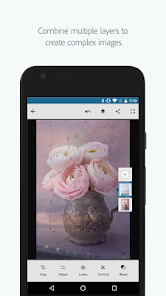
  • 😕 There's no proper “layer system” like you'd get in Photoshop Express. Once you combine two images, you can't go back and adjust the cutout without redoing the whole thing. It feels limiting compared to more advanced mobile editors where layers stack neatly.

Related Recommendation Data

Photo Tool
Photo Tool
COLIFER LAB
4.2
Money App - Earn Real Cash
International Calls App, Ltd
4.5
Sun Signs: Horoscopes
horoscope.com
4.4
Horoscope For Today
Horoscope For Today
KaApps
4
Love Horoscopes & Astrology
Horoscope TV
4.4
Ugly Camera - funny selfie
jangal LLC
4
Slow motion video fast&slow mo
One Music Player
4.5
Contacts
Contacts
Google LLC
4.2
Call Mirabel Encanto Fake Chat
Brovo developer
4.6
Quiz Challenge: Funny Filter
Braly JSC
0
Live Wallpapers HD 4K
Wallpaper app
4.4
Emoji Battery Widget
MIA Studio Inc
0
Lie Detector Test for Prank
Hydra Global Ltd.
4.6
Walli - Stunning 4K Wallpapers
Tap AI
4.3
ヘルスケア手帳 - 電子お薬手帳アプリ
ヘルスケア手帳 - 電子お薬手帳アプリ
Wemex Corporation
3.4

Disclaimer

1. All trademarks, product names, and company names featured on this site belong to their respective owners.

2. Storageapk provides specialized soccer applications developed by our in-house soccer team, accompanied by comprehensive details such as developer contact info, user ratings, and app screenshots.

3. As part of our compliance efforts, Storageapk adheres to the Digital Millennium Copyright Act (DMCA) and responds to valid infringement notices in accordance with the DMCA and other relevant laws.

4. It is important to note that Storageapk is not affiliated with any app developer, nor do we create any applications or games ourselves.

5. Should you be an owner or copyright representative wishing to have your information taken down, you may contact us via email at [email protected].

6. All website content strictly follows the guidelines outlined in the Google Ads advertising policies and the Google Unwanted Software Policy.

What You Like

DeepArtEffects AI Photo Editor
Deep Art AI GmbH
4.6
Labyrinthos Tarot Cards
Labyrinthos Academy
4.7
Live Wallpapers 3D
Live Wallpapers 3D
FunJoy Games Studio
4.3
Razor Prank (Hair Trimmer Joke
RRM Jokes, Pranks and fun apps
3.6
Sider: AI GPT Deep Chat
Sider.ai
4.5
Astrolink: Birth Chart
Astrolink Orbe
4.4
Neon Love Theme
Neon Love Theme
Delicate theme for Android App
4.6
Photo Tool
Photo Tool
COLIFER LAB
4.2
Astroscope: Astrology Guide
Astroscope App
4.4
SNAPS-photobook, photo, print
SNAPS Corp.
4.2
Digital Compass
Digital Compass
Axiomatic Inc.
4.6
知らないと恥ずかしい大人の語彙力
知らないと恥ずかしい大人の語彙力
nullhouse
4.6
Love Horoscopes & Astrology
Horoscope TV
4.4
Love Rose GIF Stickers
photo studios
3.4
NewProfilePic: Profile Picture
PHOTO LAB DMCC
4.3