Storageapk logo
App icon

Accupedo Pedometer

Corusen LLC
4.1
Downloads
5M+
Content Rating
Rated for 3+
Classification
Health & Fitness
Developer
Corusen LLC
Privacy policy
https://www.accupedo.com/privacy.html

Apps Screenshots

snapshot1
snapshot2
snapshot3
snapshot4
snapshot5
snapshot6

Editor Evaluation

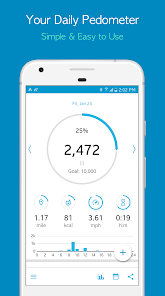
Accupedo Pedometer is a step tracking app developed by Corusen LLC that I have been using for a few months. It is a health and fitness app designed to count your daily steps, distance, calories burned, and active time using your phone's built-in sensors. The app first launched back in 2011 and is available on both the Google Play Store and the Apple App Store. On Google Play alone, the app has over 10 million installs, which gives you an idea of how popular it is among walkers and runners. The best part is that it is completely free to download, and you do not need to register or create an account to start using it. There are no mandatory sign-ups, which I really appreciate. The app does have in-app purchases for a premium version that unlocks extra features, and there are occasional ads, but they are not too intrusive.

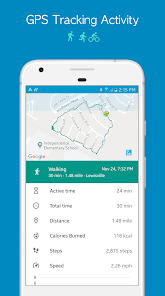
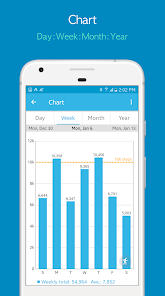
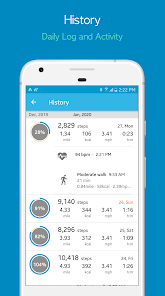
Using the Accupedo app is quite straightforward. Once you download and install it from Google Play, you simply open the app, and it immediately starts tracking your steps using the accelerometer in your phone. You do not need to manually start a session because it runs in the background automatically. One tip I found useful is to keep the app open in your recent apps list so your phone does not kill the process. You can set a daily step goal, and the app will show your progress with a nice bar chart. It also uses GPS to map your walking routes if you enable it, but that does drain the battery faster. For best results, I recommend carrying your phone in your pocket or handbag rather than a backpack to get more accurate readings.

I have tried other step counting apps like Google Fit and Pacer, but I stuck with Accupedo because it feels simpler and more reliable. The free version of Accupedo offers just as much as some paid apps, which is a big plus for me. Google Fit also tracks steps, but it integrates with other health data, which I don't always need. Pacer has a social aspect that I found distracting. With Accupedo, I get straightforward step tracking without any fluff, and it does not drain my battery as much as some other fitness apps I have tested.

Capabilities

  • ๐Ÿ“Š Battery efficient background tracking: Unlike Google Fit which can be a bit heavy on battery when using location services, Accupedo keeps the step counting running in the background using only the accelerometer. You can walk all day and still have plenty of charge left for other tasks. This is a standout feature for people who want to track steps without worrying about their phone dying by noon.
  • ๐Ÿ“Š No mandatory account registration: While apps like Pacer force you to create an account or sign in with Google or Facebook, Accupedo lets you start tracking steps immediately after you install it from Google Play. No email verification, no privacy concerns from day one. This is a huge advantage for users who value simplicity and privacy.
  • ๐Ÿ“Š Customizable step sensitivity: Accupedo has a sensitivity setting that you can adjust to match your walking style. If the app is counting too many or too few steps, you can tweak it. Google Fit does not offer such granular control, and I found this feature really helps make the data more accurate for different users.
  • ๐Ÿ“Š Offline map and route view: The app saves your walking routes locally so you can view them later even without internet. While Google Fit needs a constant connection to show your paths on a map, Accupedo works fine with no data, which is great when I go hiking or walk in areas with poor signal.

Highlights

  • ๐Ÿ“Š Motivating daily streak system: The app shows you how many days in a row you have met your goal, which is a small but powerful nudge to keep moving. Pacer has a similar feature, but Accupedo presents it more clearly on the main screen. I find myself checking it just to keep my streak alive.
  • ๐Ÿ“Š Lightweight app size: The app takes up very little space on your phone compared to Google Fit or Samsung Health. When storage is tight, this makes a real difference. You get a full-featured pedometer without the bloat.
  • ๐Ÿ“Š Works on almost any Android device: Accupedo does not require a specific brand or model. I have used it on a cheap budget phone and it runs just as smoothly as on a flagship. That is not always the case with more advanced apps that demand newer sensors or software.

Lowlights

  • ๐Ÿ“Š No smartwatch or wearable sync: Unlike Pacer or Google Fit which can sync with your smartwatch or fitness band, Accupedo does not support any external devices. If you use a Wear OS watch or a Fitbit, you cannot combine that data with this app. You are stuck with just your phone.
  • ๐Ÿ“Š GPS tracking drains battery fast: While the step counting alone is battery efficient, turning on the GPS to map your walk empties the battery quickly. Pacer handles GPS tracking more efficiently, so this is a clear drawback for long outdoor walks.
  • ๐Ÿ“Š Limited workout type variety: The app mainly focuses on walking and running. If you want to track cycling, swimming, or gym workouts, you will need a different app. Google Fit automatically detects more activities, whereas Accupedo stays narrow in its scope.
  • ๐Ÿ“Š Occasional step count inaccuracies: Sometimes the app registers steps when I am just shaking my hand or driving on bumpy roads. I have not seen this issue as much with Pacer, which seems to filter out false steps better.

Related Recommendation Data

Photo Tool
Photo Tool
COLIFER LAB
4.2
Money App - Earn Real Cash
International Calls App, Ltd
4.5
Sun Signs: Horoscopes
horoscope.com
4.4
Horoscope For Today
Horoscope For Today
KaApps
4
Love Horoscopes & Astrology
Horoscope TV
4.4
Ugly Camera - funny selfie
jangal LLC
4
Slow motion video fast&slow mo
One Music Player
4.5
Contacts
Contacts
Google LLC
4.2
Call Mirabel Encanto Fake Chat
Brovo developer
4.6
Quiz Challenge: Funny Filter
Braly JSC
0
Live Wallpapers HD 4K
Wallpaper app
4.4
Emoji Battery Widget
MIA Studio Inc
0
Lie Detector Test for Prank
Hydra Global Ltd.
4.6
Walli - Stunning 4K Wallpapers
Tap AI
4.3
ใƒ˜ใƒซใ‚นใ‚ฑใ‚ขๆ‰‹ๅธณ - ้›ปๅญใŠ่–ฌๆ‰‹ๅธณใ‚ขใƒ—ใƒช
Wemex Corporation
3.4

Disclaimer

1. All trademarks, product names, and company names featured on this site belong to their respective owners.

2. Storageapk provides specialized soccer applications developed by our in-house soccer team, accompanied by comprehensive details such as developer contact info, user ratings, and app screenshots.

3. As part of our compliance efforts, Storageapk adheres to the Digital Millennium Copyright Act (DMCA) and responds to valid infringement notices in accordance with the DMCA and other relevant laws.

4. It is important to note that Storageapk is not affiliated with any app developer, nor do we create any applications or games ourselves.

5. Should you be an owner or copyright representative wishing to have your information taken down, you may contact us via email at [email protected].

6. All website content strictly follows the guidelines outlined in the Google Ads advertising policies and the Google Unwanted Software Policy.

What You Like

DeepArtEffects AI Photo Editor
Deep Art AI GmbH
4.6
Labyrinthos Tarot Cards
Labyrinthos Academy
4.7
Live Wallpapers 3D
Live Wallpapers 3D
FunJoy Games Studio
4.3
Razor Prank (Hair Trimmer Joke
RRM Jokes, Pranks and fun apps
3.6
Sider: AI GPT Deep Chat
Sider.ai
4.5
Astrolink: Birth Chart
Astrolink Orbe
4.4
Neon Love Theme
Neon Love Theme
Delicate theme for Android App
4.6
Photo Tool
Photo Tool
COLIFER LAB
4.2
Astroscope: Astrology Guide
Astroscope App
4.4
SNAPS-photobook, photo, print
SNAPS Corp.
4.2
Digital Compass
Digital Compass
Axiomatic Inc.
4.6
็Ÿฅใ‚‰ใชใ„ใจๆฅใšใ‹ใ—ใ„ๅคงไบบใฎ่ชžๅฝ™ๅŠ›
nullhouse
4.6
Love Horoscopes & Astrology
Horoscope TV
4.4
Love Rose GIF Stickers
photo studios
3.4
NewProfilePic: Profile Picture
PHOTO LAB DMCC
4.3