Skin Editor 3D for Minecraft
Apps Screenshots
Editor Evaluation
Skin Editor 3D for Minecraft is a mobile app created by Remoro Studios that lets you design custom skins for your Minecraft characters right from your phone. It first launched on the Google Play Store back in 2018 and has since racked up over 10 million downloads, which shows how popular it is among players. The app is free to download and install, which is a huge plus if you just want to mess around with skin designs without spending anything upfront. You don't even need to register or create an account to start using it, so you can jump straight into editing after you install the app. That said, there are in-app purchases available if you want to unlock extra color palettes or premium tools, and you will encounter occasional ads while using it, but they are not too intrusive.
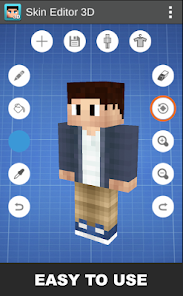
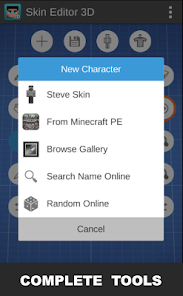
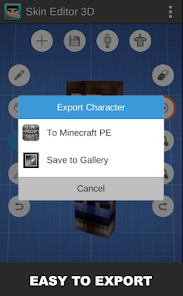
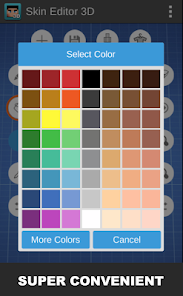
Using the app is pretty straightforward. When you open it, you see a 3D model of a Minecraft character right on the screen, and you can tap on any part of the body to paint it. You pick colors from a wheel or use the eyedropper tool to grab existing shades, then just draw with your finger. A good tip I picked up is to zoom in on the model for finer details like eyes or logos, because the default view can make small edits tricky. You can also import a skin you already have from your gallery to tweak it, or start from a blank template. Once you are done, you export the skin directly to your Minecraft game through the app, so you don't need to mess with file managers.
I have tried a few other skin maker apps on Google Play, like Skins for Minecraft, but I keep coming back to this one because of the 3D preview. In Skins for Minecraft, you mostly work with flat layers, which can make it hard to see how the design wraps around the model. Skin Editor 3D lets you rotate the character while editing, so you always know what the final look is like. It feels more intuitive as a real user, and since the app has been around for years, the updates have smoothed out most bugs. If you play Minecraft on mobile, this app is a solid choice for making unique skins.
Capabilities
- 🎨 Real-time 3D editing - Unlike apps like Skins for Minecraft, this one lets you see your design on a rotating model while you paint. You can spin the character around and spot mistakes instantly, which saves a ton of time compared to flat editors where you have to guess how the sides look.
- 🖌️ Layer system for complex designs - You can stack layers of color and details, similar to how you would in Photoshop. This is great for adding shading or patterns without ruining the base layer. Other apps like Nova Skin Maker lack this feature, so your edits often feel flat.
- 📦 Direct export to Minecraft - Once your skin is done, you can export it straight to the game with one tap. No need for third-party tools or manual file imports, which is a headache in competitors like Skin Seed where you have to copy files around.
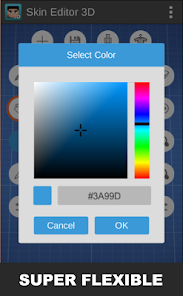
- 🌈 Wide color palette and gradient tools - The app gives you a huge range of colors and even a gradient brush, so you can blend shades smoothly. This stands out from apps like Easy Skin Maker, which stick to basic solid colors only.
Highlights
- ⚡ Lightweight and fast - The app installs quickly and runs smoothly on older phones, unlike some similar apps like Skins Pro for Minecraft that lag on low-end devices. You can edit without waiting for loading screens.
- 💾 No account needed - You can download Skin Editor 3D from Google Play and start using it right away without signing up. Other apps like Skin Studio force you to log in with an account, which feels unnecessary.
- 🆓 Free core features - Most of the useful tools are available without paying, while apps like Minecraft Skins Maker are free but hide key features behind a paywall. Here, you only pay for extras like special patterns.
Lowlights
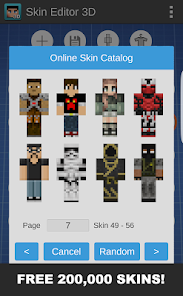
- 📉 Limited template library - Compared to apps like Skins for Minecraft, this one does not offer many pre-made skin templates to start from. You mostly have to create from scratch, which can be slow for beginners.
- 🔒 Export quality drops with free version - When you try to import a skin back to the game, the free version sometimes compresses the image a bit, losing fine details. Paid apps like Skin Seed avoid this issue entirely.
- 📱 No cross-platform sync - You cannot save your work to the cloud and pick it up on another device. Similar apps like Nova Skin have web versions that sync across phone and PC, but this one lacks that feature.
Related Recommendation Data


Disclaimer
1. All trademarks, product names, and company names featured on this site belong to their respective owners.
2. Storageapk provides specialized soccer applications developed by our in-house soccer team, accompanied by comprehensive details such as developer contact info, user ratings, and app screenshots.
3. As part of our compliance efforts, Storageapk adheres to the Digital Millennium Copyright Act (DMCA) and responds to valid infringement notices in accordance with the DMCA and other relevant laws.
4. It is important to note that Storageapk is not affiliated with any app developer, nor do we create any applications or games ourselves.
5. Should you be an owner or copyright representative wishing to have your information taken down, you may contact us via email at [email protected].
6. All website content strictly follows the guidelines outlined in the Google Ads advertising policies and the Google Unwanted Software Policy.
What You Like