Storageapk logo
App icon

Prisma Art Effect Photo Editor

Prisma Labs, Inc.
4.5
Downloads
Content Rating
Everyone
Classification
Video Players & Editors
Developer
Prisma Labs, Inc.
Privacy policy
http://prisma-ai.com/privacy.html

Apps screenshots

snapshot1
snapshot2
snapshot3
snapshot4
snapshot5
snapshot6

Prisma Art Effect Photo Editor Introduction

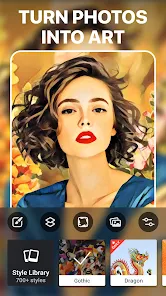
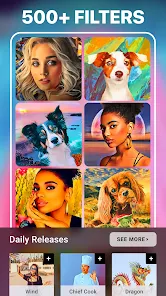
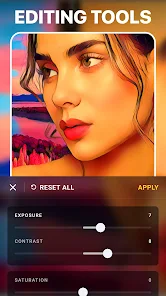
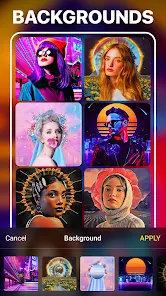
I've been using Prisma Art Effect Photo Editor, developed by Prisma Labs, Inc., for a while now, and it's definitely one of those apps that stands out on Google Play. Basically, it's a photo editing tool that transforms your regular pictures into artwork inspired by famous painters and art styles. The app first launched back in 2016 and has been available on both Google Play and the App Store since then. It's free to download and install, and as of now, it has over 100 million installs on Google Play alone, which is pretty impressive. You don't even need to register to start using it right away, though there are some optional in-app purchases for extra filters. There are also in-app ads, but they don't pop up too often, so it doesn't ruin the experience. When I first opened the app, I just picked a photo from my gallery and applied a filter to see what happens. The process is really simple: you choose or take a photo, then browse through a ton of artistic filters that range from classic oil paintings to modern abstract styles. A tip I picked up is to use high-contrast or colorful images because they tend to give the best results. Also, you can tweak the intensity of each filter with a slider, so you're not stuck with a full-on effect if that's not your thing. If you want more control, there's an option to adjust brightness or contrast before applying the art style. For me, it's all about experimenting—trying different filters on the same picture to see which one clicks. Compared to other photo editing apps I've used, like PicsArt or Snapseed, Prisma feels more focused on turning photos into art rather than just fixing them. While PicsArt has loads of tools for stickers and collages, Prisma puts the spotlight on that artistic transformation. I ended up choosing this app over others because it offers something unique—it feels like you're creating a painting, not just editing a snapshot. Plus, the variety of filters keeps it fresh, and I love that it doesn't require a huge learning curve. For someone like me who isn't a pro, it's just fun to play around with.

Compare similar apps

🎨 One standout feature is the huge library of artistic filters. Unlike apps like PicsArt, which focus more on general editing, Prisma has over 300 filters that mimic styles from artists like Van Gogh or Picasso. This makes it perfect for when I want my photos to look like gallery pieces rather than just snapshots. 🖼️ Another thing I love is the real-time preview. As you swipe through filters, you can see the effect instantly on your photo, which saves a ton of time. In contrast, some similar apps require you to tap each filter and wait, but Prisma makes it smooth and quick. ✨ The app also offers a “Style Transfer” feature that blends your photo's content with an art style. It's not just a simple overlay; it really integrates the details. Compared to something like Adobe Photoshop Express, which has basic effects, Prisma feels more creative and less generic.

Pros

🌟 A big strength is how easy it is to use. You don't need any special skills to get beautiful results, unlike with more complex apps like Lightroom, which has a steeper learning curve. For me, that simplicity is a huge plus. 📱 Another strength is the range of styles. From impressionist to pop art, there's something for every mood. Apps like VSCO have nice presets, but they don't give that artistic vibe that Prisma nails. 💾 It also lets you export high-resolution images. Some photo editor apps limit quality unless you pay, but Prisma gives you good resolution for free, which is a nice touch when you want to print or share your work.

Cons

⏳ A major weakness is the loading time. Sometimes, applying a filter takes a while, especially with high-res photos. Apps like Snapseed are much snappier because they don't process art styles in the same way. It can get frustrating when you're in a hurry. 📶 The app requires an internet connection to process many filters. Unlike offline editors like PicsArt, Prisma often needs to upload your photo to their server, so it's not usable without a solid connection. That's a downside for me. 💸 Another issue is the limited free filters. While there are many options, the best ones are locked behind a paywall in the in-app purchases. Apps like Canva offer more free resources, so this feels a bit restrictive.

Related recommendation data
Walli - Stunning 4K Wallpapers
Tap AI
4.3
Fitbit
Fitbit
Google LLC
4.1
Love Horoscopes & Astrology
Horoscope TV
4.4
Hair Color Changer: Change you
Face & Body Tune Photo Editor SRL
3.4
Air Horn Prank (Loud Joke)
RRM Jokes, Pranks and fun apps
4
Prank Call Voice Changer App
Ownage Labs Apps
3.6
Horoscope of Birth
Horoscope of Birth
Denimaks
4.6
ANIME Live Wallpapers 4K HD
Live Wallpapers Expert
4.3
Prisma Art Effect Photo Editor
Prisma Labs, Inc.
4.5
Adobe Photoshop Mix - Cut-out,
Adobe
3.4
ChatBot - AI Chat
ChatBot - AI Chat
X PhotoKit
4
Sun Signs: Horoscopes
horoscope.com
4.4
Rolling Icon: 3D Wallpaper
Maxlabs Personalization Tools
4.4
ヘルスケア手帳 - 電子お薬手帳アプリ
ヘルスケア手帳 - 電子お薬手帳アプリ
Wemex Corporation
3.4
Skin Editor 3D for Minecraft
Remoro Studios
4.3

Disclaimer

1. Storageapk does not represent any developer, nor is it the developer of any App or game.

2. Storageapk provide custom reviews of Apps written by our own reviewers, and detailed information of these Apps, such as developer contacts, ratings and screenshots.

3. All trademarks, registered trademarks, product names and company names or logos appearing on the site are the property of their respective owners.

4. Storageapk abides by the federal Digital Millennium Copyright Act (DMCA) by responding to notices of alleged infringement that complies with the DMCA and other applicable laws.

5. If you are the owner or copyright representative and want to delete your information, please contact us [email protected].

6. All the information on this website is strictly observed all the terms and conditions of Google Ads Advertising policies and Google Unwanted Software policy.

7. Storageapk.com is an independent, information-only website which is 100% free to all the users.

What you like

Genral Tv | Video Player
the genral
0
Subway Korea(route navigation)
(주)넵튠
4.4
Voila AI Artist Cartoon Filter
Wemagine.AI
4.5
Fake video call - Prank call
HiddenScreen.NET
0
Xfinity Stream
Xfinity Stream
Comcast
4.2
Daily Horoscope 2026
Code Blenders
4.3
Skin Editor 3D for Minecraft
Remoro Studios
4.3
Wallpapers HD - Backgrounds 4K
TarrySoft
4.6
4D Parallax Wallpaper 3D HD 4K
Wallpapers by Vinwap
4.5
Daily Horoscopes 2025
KADO Apps
4.1
Air Horn
Air Horn
Tenoku
4.8
iThemes - Easy Widgets, Icons
Wallpaper World Designs
4.8
Drawing Apps: Coloring & Color
Tech 4 All Apps
4.4
AR Drawing - Sketchar App
Braly JSC
4.4
Money App - Earn Real Cash
International Calls App, Ltd
4.5