Storageapk logo
App icon

Opera Mini: Fast Web Browser

Opera
4.7
Downloads
500M+
Content Rating
Rated for 3+
Classification
Social
Developer
Opera
Privacy policy
http://www.opera.com/privacy

Apps Screenshots

snapshot1
snapshot2
snapshot3
snapshot4
snapshot5
snapshot6

Editor Evaluation

Opera Mini is a fast web browser app developed by Opera, first launched way back in 2005. You can grab it for free on both the Google Play Store and Apple's App Store, with the Android version alone racking up over a billion installs on Google Play. It's totally free to download and use, but it does have in-app ads popping up here and there. You don't need to register to start browsing, though signing up for a free account unlocks sync features. There are also optional in-app purchases for things like ad removal.

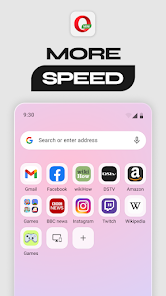
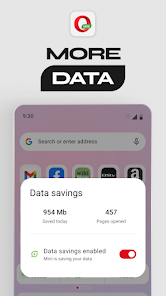
Using Opera Mini is pretty straightforward. Just open the app, type a URL or search term into the address bar, and you're off. A big tip to get the most out of it is to enable the data saver mode, which compresses web pages on Opera's servers before sending them to your phone. This makes pages load way faster on slow connections and saves your mobile data. For a speed boost, I suggest blocking ads in the settings, which also declutters sites. Another handy trick is using the built-in ad blocker and night mode for easier reading in the dark. The app also has a news feed on the start page, but you can customize or disable it if you prefer a clean start screen.

I compared Opera Mini with the default browser on my phone and with Chrome, which is the giant on Google Play. Chrome is solid, but it eats up data and RAM more than Opera Mini, at least in my experience. I chose Opera Mini mainly because it handles slow networks really well—pages load even when my signal is weak. On my older phone, Chrome felt sluggish, while Opera Mini felt snappy. Plus, its built-in video downloader is a neat bonus that Chrome doesn't offer natively. Other similar apps like UC Browser also compress data, but I found Opera Mini's interface cleaner and less cluttered with ads. For a lightweight, no-nonsense browsing app, it really does the job.

Capabilities

  • 🚀 Outstanding data compression: Opera Mini compresses web pages by up to 90% before they reach your phone, which is a game-changer compared to Chrome on Google Play. Chrome downloads full pages, so on a spotty 3G connection, Opera Mini loads in seconds while Chrome might time out. It's perfect for saving data and speeding up browsing on slow networks.
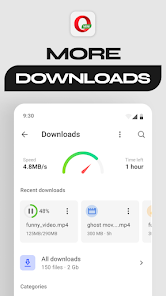
  • 📺 Built-in video downloader: This is a feature I haven't seen in any other major browser app. Opera Mini lets you download videos directly from streaming sites with a simple pop-up. Chrome doesn't offer this at all, so for anyone who likes saving clips for offline viewing, this is a huge plus.
  • 🛡️ Ad blocker and night mode: The ad blocker inside Opera Mini is surprisingly effective out of the box, making pages load cleaner than in Firefox for Android. Night mode reduces eye strain with a simple toggle, which is more convenient than fiddling with Chrome's system dark mode, which doesn't always work on websites.

Highlights

  • 🎯 Speed on slow connections: Where other apps like Google Chrome freeze, Opera Mini keeps chugging. Its server-side compression makes it hands-down the fastest option when you're stuck on 2G or weak Wi-Fi. This single strength made me keep it on my phone for months.
  • 📉 Low data usage: Opera Mini uses much less data than UC Browser or Edge. For users with limited data plans, it's a lifesaver. Every page feels lighter, so you can browse longer without hitting your cap.
  • 🔍 Clean, ad-free news feed: The start page news feed is optional and less spammy than in UC Browser. I like that I can turn it off completely, leaving a minimal search bar. Chrome's home screen doesn't have personalized news without extra steps.

Lowlights

  • 🐢 No extensions support: Unlike Firefox on Google Play, Opera Mini doesn't let you install add-ons like password managers or script blockers. This is a real bummer for power users who want more control over their browsing experience.
  • 🌐 Missing desktop features: Syncing bookmarks between Opera Mini and desktop browsers is clunky compared to Chrome's seamless sync via Google accounts. You have to use Opera's account system, and it's not as smooth.
  • 🔄 Tab management is basic: The tab switcher in Opera Mini is functional but less organized than in Brave or Chrome. I often lose track of open tabs because there's no grouping feature.

Related Recommendation Data

Photo Tool
Photo Tool
COLIFER LAB
4.2
Money App - Earn Real Cash
International Calls App, Ltd
4.5
Sun Signs: Horoscopes
horoscope.com
4.4
Horoscope For Today
Horoscope For Today
KaApps
4
Love Horoscopes & Astrology
Horoscope TV
4.4
Ugly Camera - funny selfie
jangal LLC
4
Slow motion video fast&slow mo
One Music Player
4.5
Contacts
Contacts
Google LLC
4.2
Call Mirabel Encanto Fake Chat
Brovo developer
4.6
Quiz Challenge: Funny Filter
Braly JSC
0
Live Wallpapers HD 4K
Wallpaper app
4.4
Emoji Battery Widget
MIA Studio Inc
0
Lie Detector Test for Prank
Hydra Global Ltd.
4.6
Walli - Stunning 4K Wallpapers
Tap AI
4.3
ヘルスケア手帳 - 電子お薬手帳アプリ
ヘルスケア手帳 - 電子お薬手帳アプリ
Wemex Corporation
3.4

Disclaimer

1. All trademarks, product names, and company names featured on this site belong to their respective owners.

2. Storageapk provides specialized soccer applications developed by our in-house soccer team, accompanied by comprehensive details such as developer contact info, user ratings, and app screenshots.

3. As part of our compliance efforts, Storageapk adheres to the Digital Millennium Copyright Act (DMCA) and responds to valid infringement notices in accordance with the DMCA and other relevant laws.

4. It is important to note that Storageapk is not affiliated with any app developer, nor do we create any applications or games ourselves.

5. Should you be an owner or copyright representative wishing to have your information taken down, you may contact us via email at [email protected].

6. All website content strictly follows the guidelines outlined in the Google Ads advertising policies and the Google Unwanted Software Policy.

What You Like

DeepArtEffects AI Photo Editor
Deep Art AI GmbH
4.6
Labyrinthos Tarot Cards
Labyrinthos Academy
4.7
Live Wallpapers 3D
Live Wallpapers 3D
FunJoy Games Studio
4.3
Razor Prank (Hair Trimmer Joke
RRM Jokes, Pranks and fun apps
3.6
Sider: AI GPT Deep Chat
Sider.ai
4.5
Astrolink: Birth Chart
Astrolink Orbe
4.4
Neon Love Theme
Neon Love Theme
Delicate theme for Android App
4.6
Photo Tool
Photo Tool
COLIFER LAB
4.2
Astroscope: Astrology Guide
Astroscope App
4.4
SNAPS-photobook, photo, print
SNAPS Corp.
4.2
Digital Compass
Digital Compass
Axiomatic Inc.
4.6
知らないと恥ずかしい大人の語彙力
知らないと恥ずかしい大人の語彙力
nullhouse
4.6
Love Horoscopes & Astrology
Horoscope TV
4.4
Love Rose GIF Stickers
photo studios
3.4
NewProfilePic: Profile Picture
PHOTO LAB DMCC
4.3