Prank Call Voice Changer App
Apps Screenshots
Editor Evaluation
I've been messing around with the Prank Call Voice Changer app from Ownage Labs Apps for a few weeks now, and honestly, it's a blast if you're into silly phone gags or just want to goof on your buddies. This app is exactly what it sounds like — it lets you change your voice in real time during calls, making it perfect for pranks or even just adding some fun to a boring conversation. It first launched back in 2018, and you can grab it on Google Play and the App Store. On the Google Play store, it's racked up over a million installs so far, which tells me it's got a pretty solid fanbase. The app is free to download and install, which is great, but there are some in-app purchases if you want the fancier voice packs or remove ads. You don't need to register an account to start using it, so you just download it and jump straight into the action. There are in-app ads, which can pop up occasionally, but they weren't too annoying for me.
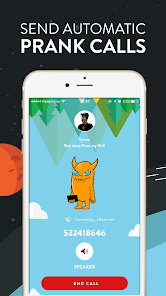
When you first open the Prank Call Voice Changer app, you'll see a pretty straightforward interface. You pick your voice preset — options range from a deep robot voice to a silly chipmunk or even a scary demon. After that, you dial your target or import a contact, and the app works as a middleman for the call. My biggest tip is to test the voice first with a friend who's in on the joke, because sometimes the background noise can mess with the effect. Another thing I learned the hard way — use headphones if you can, because the echo can tip off the person on the other end if you're not careful. The app also has a soundboard feature where you can add in cackling laughs or airhorns, which really sells the prank.
I've tested a few similar apps over the years, like Prank Dial or Voice Changer with Effects, but I keep coming back to this one. Why? Because Ownage Labs Apps actually updates this thing regularly, so it works on newer Android versions without crashing. Other apps I tried felt outdated or glitchy after big OS updates. Plus, the voice quality here is way more natural — not that tinny sound you get with some free apps. If you want a reliable prank tool that doesn't require a whole tutorial to figure out, this is the one.
Capabilities
- 🎭 Real-time voice changing during live calls — Unlike many competitors that only record your voice, this one lets you prank someone in the moment, which makes it way more immersive.
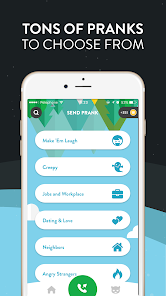
- 🎭 A huge library of preset voices — It includes classics like helium, skull, and zombie, plus some premium ones you can unlock. This is miles ahead of simpler apps that only give you one or two options.
- 🎭 Built-in soundboard with effects — You can drop in laugh tracks, sirens, or random noises mid-call. I haven't seen that in other free apps like Prank Dial, which mostly just rely on voice-only changes.
- 🎭 Clean, easy-to-navigate interface — The app doesn't overwhelm you with ads or confusing menus. Some popular alternatives bury you in settings, but this one keeps it simple so you can prank fast.
Highlights
- 👍 Consistent updates from Ownage Labs Apps — They've fixed bugs and added new voices every few months. Other apps like Voice Changer Pro get abandoned after a year, so this longevity is huge.
- 👍 No registration required — You can download and install it from Google Play without handing over your email or phone number. Similar apps often force a sign-up before you even see the features.
- 👍 Works offline for basic voices — If you're in a spot with bad service, the app still functions fine. Some competitors demand a constant internet connection, which kills the fun if you're out pranking friends.
Lowlights
- 👎 The free version has limited premium voice packs — You'll feel tempted to buy the full set after a few uses. A similar app like Funny Voice Changer gives away more voices for free, which feels fairer.
- 👎 Ads can interrupt at bad moments — During a prank call, an ad popped up once and ruined the flow. Other apps I've tried, like Prank Master, let you pay a small one-time fee to remove ads permanently without the subscription model.
- 👎 Latency on older phones — On my old Samsung device, there was a slight delay in the voice change. Competitors like Voice Changer X handle this better because they use lighter processing.
- 👎 No video call support — You can only use it for standard phone calls. Apps like Snapchat or Discord have built-in voice changers for video, which makes this feel limited for modern social needs.
Related Recommendation Data


Disclaimer
1. All trademarks, product names, and company names featured on this site belong to their respective owners.
2. Storageapk provides specialized soccer applications developed by our in-house soccer team, accompanied by comprehensive details such as developer contact info, user ratings, and app screenshots.
3. As part of our compliance efforts, Storageapk adheres to the Digital Millennium Copyright Act (DMCA) and responds to valid infringement notices in accordance with the DMCA and other relevant laws.
4. It is important to note that Storageapk is not affiliated with any app developer, nor do we create any applications or games ourselves.
5. Should you be an owner or copyright representative wishing to have your information taken down, you may contact us via email at [email protected].
6. All website content strictly follows the guidelines outlined in the Google Ads advertising policies and the Google Unwanted Software Policy.
What You Like