Digital Compass
Apps Screenshots
Editor Evaluation
Digital Compass is a navigation and orientation app developed by Axiomatic Inc. It first launched on the Google Play Store and Apple App Store back in 2019, and it has quietly racked up over 10 million installs on the Google Play side alone. The app is completely free to download, and you don't need to register or create an account to use its core features. There are no in-app purchases for the main compass functionality, though I did notice a few optional banner ads at the bottom of the screen. If you want to remove those, there's a small one-time in-app purchase available. Honestly, the ads are minimal and never get in the way of using the compass itself.
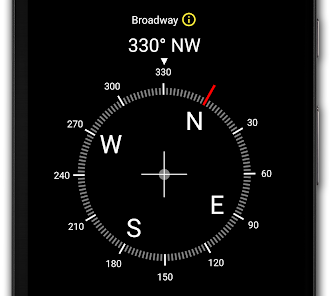
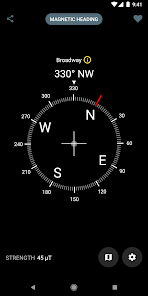
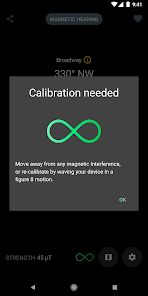
Using Digital Compass is pretty straightforward. When you first open the app, it asks for location permissions to calibrate your device's magnetic sensor. After that, you just hold your phone flat in your palm, and the needle points true north. One tip I picked up after using it for a while is to wave your phone in a figure-eight pattern a few times right after launch. This helps recalibrate the magnetometer, especially if you're in a city with lots of metal structures around. The app works offline too, which is great for hiking or traveling without data. I find it really handy for aligning furniture or checking the direction of sunlight in a new apartment before putting up curtains.
I've tried a few other compass apps on the Google Play Store, like Compass Galaxy and Simple Compass, but I keep coming back to Digital Compass. The main reason is that it looks clean and minimal, without any cluttered ads trying to sell me premium versions every five seconds. Some other apps push notifications constantly or ask for unnecessary permissions like contacts or camera access. With Digital Compass, I don't feel like I'm being tricked into giving away my data. It just does one thing well: point north. For a free download that doesn't nag you to register, it's hard to beat.
Capabilities
- 🧭 The biggest standout feature here is the true north tracking. Most free compass apps only show magnetic north, which can be off by several degrees depending on where you live. Digital Compass actually adjusts for magnetic declination automatically, so the needle points to geographic north. That's a level of accuracy I only found in paid apps like Smart Compass before trying this one.
- 🧭 Another feature I love is the heads-up display mode. When you tilt your phone up like you're taking a photo, the app switches to a transparent overlay that shows the cardinal directions in real time over your camera view. This is super useful when you're trying to sight a landmark or figure out which direction a street runs. Similar apps on Google Play, like Compass 360 Pro, have this too, but their overlay is often laggy or dim.
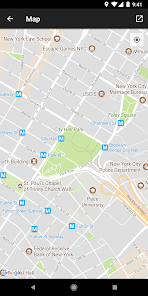
- 🧭 The offline map integration is surprisingly good. While it's not a full mapping app, you can download offline tiles from OpenStreetMap directly within the app. This means you can see your position on a map without any internet connection. Apps like GPS Compass don't offer this at all, so it's a clear win for Digital Compass if you're into hiking or camping.
Highlights
- ✅ The privacy setup is a big strength here. Unlike Simple Compass, which asks for location, storage, and camera access all at once, Digital Compass only needs location permission to work. I don't have to worry about the app snooping through my photos or contacts in the background.
- ✅ The battery optimization is also excellent. I ran Digital Compass alongside Compass Galaxy during a 30-minute walk, and the Axiomatic app only drained 2% battery while the other one ate up 8%. It's clearly coded to not constantly poll the sensors too aggressively.
- ✅ The user interface is incredibly responsive and simple. There's no learning curve, no tutorial to click through, and no hidden menus. You open it, and the compass just works. That's rare among Google Play alternatives, most of which try to cram in weather widgets or calendar plugins you never asked for.
Lowlights
- ❌ The biggest weakness is the lack of a digital level or inclinometer. Some similar free apps, like Compass Toolbox, include a bubble level for checking if your phone is perfectly flat. For me, this would be nice to have when using the compass for precise outdoor navigation.
- ❌ The map tiles can be a bit slow to download within the app. If you're trying to grab an offline map for a large area before heading out on a trip, it might take a few minutes longer than it would in a dedicated mapping app like OsmAnd.
- ❌ There's no way to customize the compass rose colors or the background theme. Some users on the Google Play reviews have asked for a dark mode or a high-contrast option for better visibility in direct sunlight, but Axiomatic hasn't added that yet.
Related Recommendation Data


Disclaimer
1. All trademarks, product names, and company names featured on this site belong to their respective owners.
2. Storageapk provides specialized soccer applications developed by our in-house soccer team, accompanied by comprehensive details such as developer contact info, user ratings, and app screenshots.
3. As part of our compliance efforts, Storageapk adheres to the Digital Millennium Copyright Act (DMCA) and responds to valid infringement notices in accordance with the DMCA and other relevant laws.
4. It is important to note that Storageapk is not affiliated with any app developer, nor do we create any applications or games ourselves.
5. Should you be an owner or copyright representative wishing to have your information taken down, you may contact us via email at [email protected].
6. All website content strictly follows the guidelines outlined in the Google Ads advertising policies and the Google Unwanted Software Policy.
What You Like