

App listing review
Contacts
Published by Google LLC
Prepared by Storageapk Editorial Team
First recorded:
Source checked:
Basis: Listing fields, screenshots, developer sources, and Android package-risk checks
Review basis
This page checks the stored listing, screenshots, developer sources, version details, and package identity. It does not claim hands-on testing. Confirm changing features, availability, and permissions with the developer.
Read our editorial and corrections policyListing screenshots
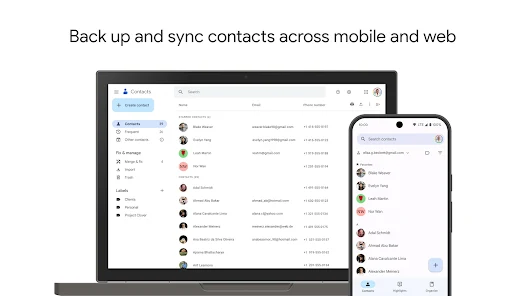
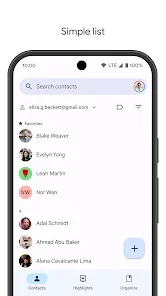
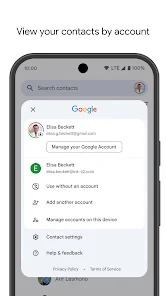
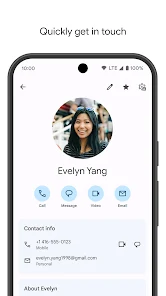
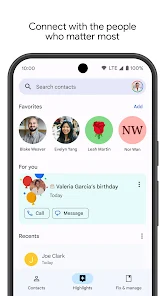
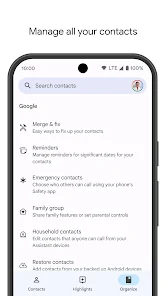
These images are listing material supplied for the app. They are useful for checking interface expectations but are not presented as Storageapk test evidence.
Overview
Google LLC publishes Contacts, which is catalogued under Communication. The package recorded for this page is com.google.android.contacts.
For communication and social apps, review account recovery, blocking and reporting controls, contact access, message privacy, and deletion options before adding personal information.
The notes below use the stored listing, screenshots, version record, developer links, and Android package identity. They do not claim a laboratory test or personal use of the app, so changing features must be checked against the current developer release.
Listing details
Android uses the package name and signing certificate to distinguish one application from another. A matching title or icon is not enough to establish that a file is the same release.
Ratings and install totals are listing snapshots rather than Storageapk measurements. Version, size, and availability can change after the source-check time shown on the page.
- Title: Contacts
- Developer: Google LLC
- Package: com.google.android.contacts
- Category: Communication
- Content rating: Rated for 3+
- Listing installs: 5B+
- Listing score: 4.2
- Stored version: 4.73.27.871645217
- Listed package size: 25.3 MB
- Listing screenshots: 6
Current feature checks
These topics come from the app-specific listing record. Check each one in the current release because controls, account requirements, and regional availability can change.
Screenshots can show where a control was placed at one point in time, but they do not prove current behavior or output quality.
- Duplicate merging made easy: Check this control in the current release and note the steps needed to reach it. Note the Android version, account, connection, permission, and device conditions required for a repeatable result.
- Contact history and interaction log: Confirm that this option is still present and available for the relevant device and region. Review where data is stored, which account receives it, and how export, recovery, and deletion are handled.
- Smart search: Use a small sample task to verify the input, controls, and result before relying on it. Inspect source access, preview accuracy, output resolution, saved-file location, and retained metadata.
Where it may fit
Suitability depends on the task, device, and data involved. The following points are practical checks rather than claims of superior performance.
- cross-device sync: Check the setup time and ongoing access needed before treating this as a practical benefit. Review where data is stored, which account receives it, and how export, recovery, and deletion are handled.
- Completely free with zero subscriptions: Confirm that the result is useful on the intended screen size, account, and Android version. Note the Android version, account, connection, permission, and device conditions required for a repeatable result.
- Security and backup security and backup: Judge this point against the specific task the app is being considered for. Review where data is stored, which account receives it, and how export, recovery, and deletion are handled.
Limits to consider
Before relying on Contacts, check these possible limits against recent release notes and the intended Android device.
- Too reliant on a Google account: Try this boundary with non-sensitive sample data and stop if the required access is excessive. Review where data is stored, which account receives it, and how export, recovery, and deletion are handled.
- Limited customization for contact fields: Check whether this restriction still applies to the stored version and the intended device. Review where data is stored, which account receives it, and how export, recovery, and deletion are handled.
- Occasional in-app ads: Look for a current developer note or a documented workaround before depending on this part of the app. Note the Android version, account, connection, permission, and device conditions required for a repeatable result.
Privacy and installation checks
Review browsing data, contacts, microphone, camera, notifications, and default-app permissions. Check account deletion and the developer privacy policy before using a sensitive account.
Before installing Contacts, confirm com.google.android.contacts, calculate the file SHA-256 checksum, inspect the signing certificate, and compare the signer with a release obtained from a trusted source.
A privacy-policy URL is present in the listing. Read it for collection, retention, sharing, deletion, and contact details before granting sensitive access.
A developer website is also recorded. Use it together with https://play.google.com/store/apps/details?id=com.google.android.contacts to verify support information and current availability.
The app may be suitable when its current controls, compatibility, permissions, and data handling match the intended task. Stop installation when the package, signer, requested access, or visible behavior differs from the trusted source.
Primary listing sources
Confirm current availability, permissions, pricing, and release notes with the developer before installing any package.